Fluids
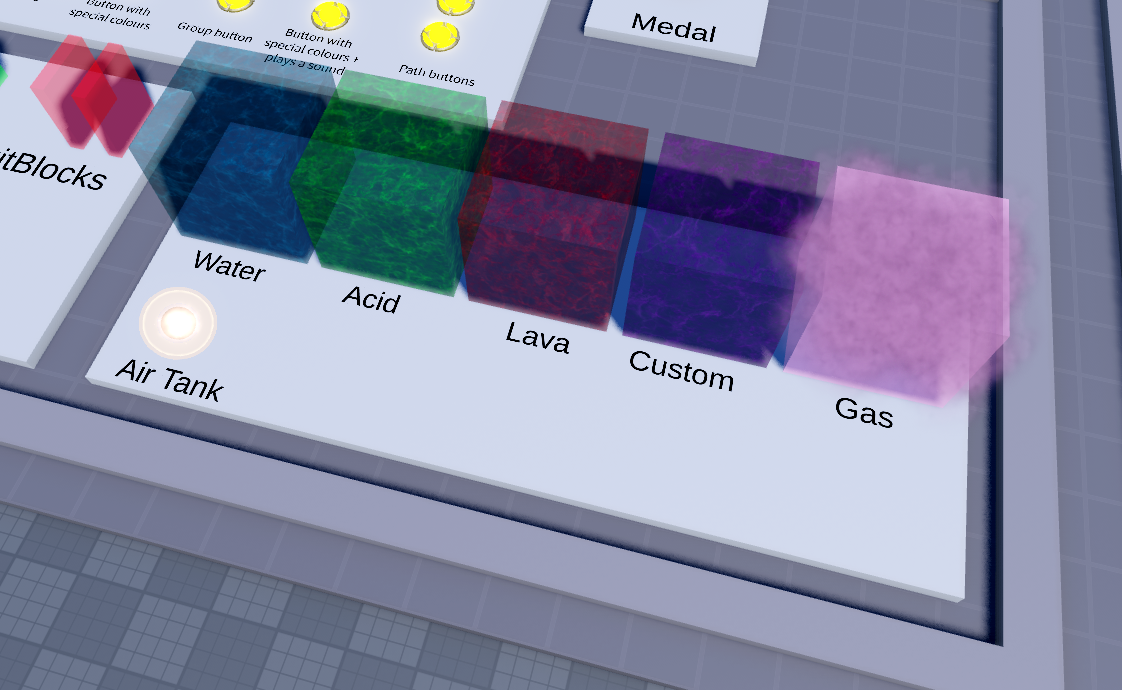
It wouldn’t be a Flood Escape inspired game without liquids, and in most maps, you’ll be escaping from these. To create a liquid, create a new part inside the Special > Fluid folder, name it _Liquid# (where # is a unique number assigned to the liquid) make it CanCollide false, and assign a state to the liquid by adding a string attribute named ‘Type’.
Default Fluid States
Functionally, the main difference between fluid states is how fast they drain your oxygen.
- Water
- 8 oxygen/second
- Acid
- 30 oxygen/second
- Lava
- Instantly drains to 0 oxygen (death)
You can assign a different state to a liquid using scripting, and using this method, the liquid will change color depending on the new liquid state.
Custom Fluid States
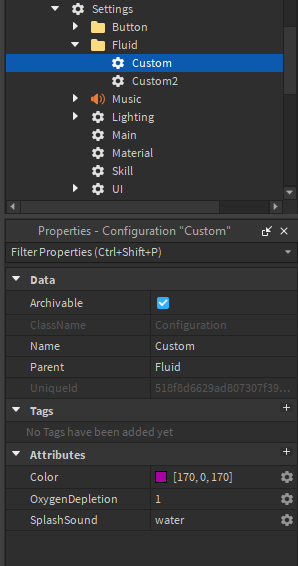
You can also create your own fluid states by creating a new Configuration under Settings > Fluids. You’ll find a pre-made ‘custom’ fluid state with three attributes:
- Color
- OxygenDepletion (as a rate of oxygen/s)
- SplashSound
- Audio ID for the sound that plays when players enter or exit the fluid
You can assign a different state to a liquid using scripting, and using this method, the liquid will change color depending on the new liquid state.
Gas
Gases are essentially liquids without the swimming functionality. They can use the same fluid states as liquids, including any custom fluid types you may create. As you might assume, they’re created basically the same way. To create a gas, add a part inside Special > Fluid and name it _Gas# (# being a unique number). Make it CanCollide false, and assign a state to the gas by adding a Type string attribute.
Air Tanks
Air Tanks are a type of Interactable (located under Special > Interactable) which give players an extra amount of oxygen when touched. The oxygen from the air tank is consumed before the player’s regular oxygen amount. The amount of oxygen stored by an air tank is controlled by an Oxygen number attribute.
Oxygen Settings
You can customize both the player’s default oxygen in your map along with the oxygen refill rate using attributes under Settings > Fluids.